Are We Really Protected?
The following live chat transcripts relate to customer interactions with Casilando.com,
a platform operated by White Hat Gaming under licence from the UK Gambling Commission.
Customer Support Transcript 26 February 2026 @ 14:03 PM
Casilando Bot:
Hi there. How can I help you today?
Casilando Bot:
Full Name: A Customer
Email Address: A.Customer@gmail.com
Casilando Bot:
Connecting you with someone now.
Harriet:
Hello there
Customer:
Hi Harriet, it’s me again
Customer:
A Customer: dd/mm/yyyy
Customer:
I would like to self exclude for 5 years please
Customer:
You there?
Customer:
Hello
Harriet:
Thank you for returning bak to the live chat
back
as this is a new chat I will request if you can please confirm the following details: your first name and last name, as well as your date of birth.
Customer:
A Customer:, 11/08/1992
Harriet:
Thank you very much for providing your details
Harriet:
Please do allow me a few moments to assist with your query
Customer:
Thank you, no clarify, I believe I have a gambling problem, as you will be able to see from the fact that I have spent 48 hours non stop gambling, I would like to self exclude for 5 years please
Harriet:
I am here still
Customer:
Self exclusion should be very VERY simple but it’s not available on your site, you only have time out for a maximum of 5 days!
Customer:
Thanks for letting me know,
Customer:
May I ask why it is taking so long, to self exclude is a very simple process
Zac:
Hi Customer:. I'll be assisting you further. Can you please confirm your date of birth and mobile number.
Exact time: 14:16:44.317 Zac starts typing
Exact time: 14:16:55.751 Zac Posted
Customer:
Sorry, no, I’m not repeating myself for the 3rd time, all the details are in the chat! Zac, it’s very simple, I want to self exclude
Customer:
In fact, according to the gambling commission, I have already self excluded
Zac:
Sorry if this seems tedious Customer:. Please note that due to the nature of the request we needed to confirm additional details.
We confirm that we have applied an operator exclusion to your account for the maximum period of 5 years.
We also confirm that you are blocked from registering accounts with us across our entire network.
We would advise that if you have not already done so, that you seek free support from gambling related organisations such as Gamcare (www.gamcare.org.uk) or BeGambleAware (www.begambleaware.org) or you can call the National Gambling Helpline free on 0808 8020 133. There are also more general support agencies such as the Samaritans www.samaritans.org who provide support 24 hours a day, 365 days a year, and who you can call for free on 116 123.
We would also like to draw your attention to the following link, which gives details of an online multi-operator self-exclusion scheme, which enables you to sign up and automatically be self-excluded across most UK operators: https://www.gamstop.co.uk
Additionally, we encourage you to install Betblocker: www.betblocker.org which is a gambling website blocking software.
We also advise that you contact other operators that you may hold accounts with and self-exclude from those also.
Customer:
Thank you Zac, it’s appreciated, can you advise why it’s not possible to do this from your website, you can only take a break for a maximum of 5 days
Zac
All responsible gaming tools are available via the responsible gaming page. Please do click on the following link to view out available tools:
https://www.casilando.com/index.php?page=responsible-gaming
Customer:
Yes but there is no way to self exclude, you only have take a break / time out
Customer:
You talk about exclusion but only through GameStop
Customer:
Are you stating that self exclusion is available through your site?
Zac
You are able to self exclude using the link provided. Alternatively you are able to reach out for any assistance.
https://www.casilando.com/index.php?page=responsible-gaming
Customer Support Transcript 23 March 2026 @ 04:41 AM
(04:41) Casilando Bot: Hello. Please fill in your details below.
(04:41) Full Name: A Customer
Email Address: A.Customer@gmail.com
(04:41) Casilando Bot: Thank you for reaching out.
(04:41) Casilando Bot: Please hold, you will be connected to an agent as soon as one is available.
(04:43) Miguel: Hi, you are with Miguel, please let me know how I can assist?
(04:43) CUSTOMER: hi,
(04:44) CUSTOMER: i wanted to know how you can self exclude on your site, I am not saying I want to self exclude now I just wanna know how i can do it if i need to
(04:44) Miguel: Please allow me a moment to look into that for you.
(04:45) Miguel: I see you are using our site during the early hours. I just wanted to check in and make sure that you're doing okay and enjoying your time on site. We've got some handy tools to help you play responsibly whenever you like. https://www.casilando.com/en/responsible-gambling
(04:46) CUSTOMER: Thank you I have read that, but this nowhere when your site taking consult which self exclude without talking to live chat
(04:48) Miguel: I am transferring you to senior support.
(04:48) CUSTOMER: Thank you
(04:49) Mason: Hi Customer, I will be assisting you further.
(04:50) Mason: Our Self-exclusion with which you will be blocked from accessing your account for a defined period of 6 months and up to 5 years.
Details of these and other responsible gambling tools offered, can be viewed or applied on our Responsible Gambling page:
Alternatively, I would be happy to assist you with applying your preference, on your behalf. Kindly share the reason for your self-exclusion request please?
(04:51) CUSTOMER: I’m not requesting self-exclusion right now.
I just want to know:
Where exactly in my account can I activate self-exclusion myself without contacting support?
Please provide the exact steps or location.
(04:52) Mason: Yes, certainly. Please follow this link https://www.casilando.com/en/responsible-gambling which will re-direct you to having a self-exclusion applied by yourself without joining live support.
(04:54) CUSTOMER: This link only takes me to the Responsible Gambling policy page.
It does not show any actual option or steps to apply self-exclusion myself.
Please confirm clearly:
Is there a self-exclusion button or tool in my account settings?
If yes, provide the exact path (e.g. My Account → … → …).
If not, please confirm that self-exclusion must be applied via support.
(04:59) Mason: Thank you for letting me know about this.
(05:00) CUSTOMER: I have reviewed the page you sent (https://www.casilando.com/en/responsible-gambling)
It provides clear instructions for the “time-out” feature (including accessing it via My Account → Responsible Gaming section), but it does not provide any instructions, link, or steps for self-exclusion.
There is no visible self-exclusion button or path shown on that page.
So I need you to clarify:
Is there an actual self-exclusion tool inside the account that I can access myself without contacting support?
If yes, please provide the exact navigation steps (e.g. My Account → … → …).
If not, please confirm that self-exclusion can only be applied via support.
(05:02) Mason: In this instance, you should be able to set a self-exclusion in your 'My account' section.
(05:03) Mason: Kindly join us on live support should you wish to proceed with a self-exclusion.
(05:04) CUSTOMER: please wait
(05:07) USER uploaded: casilando.com.png
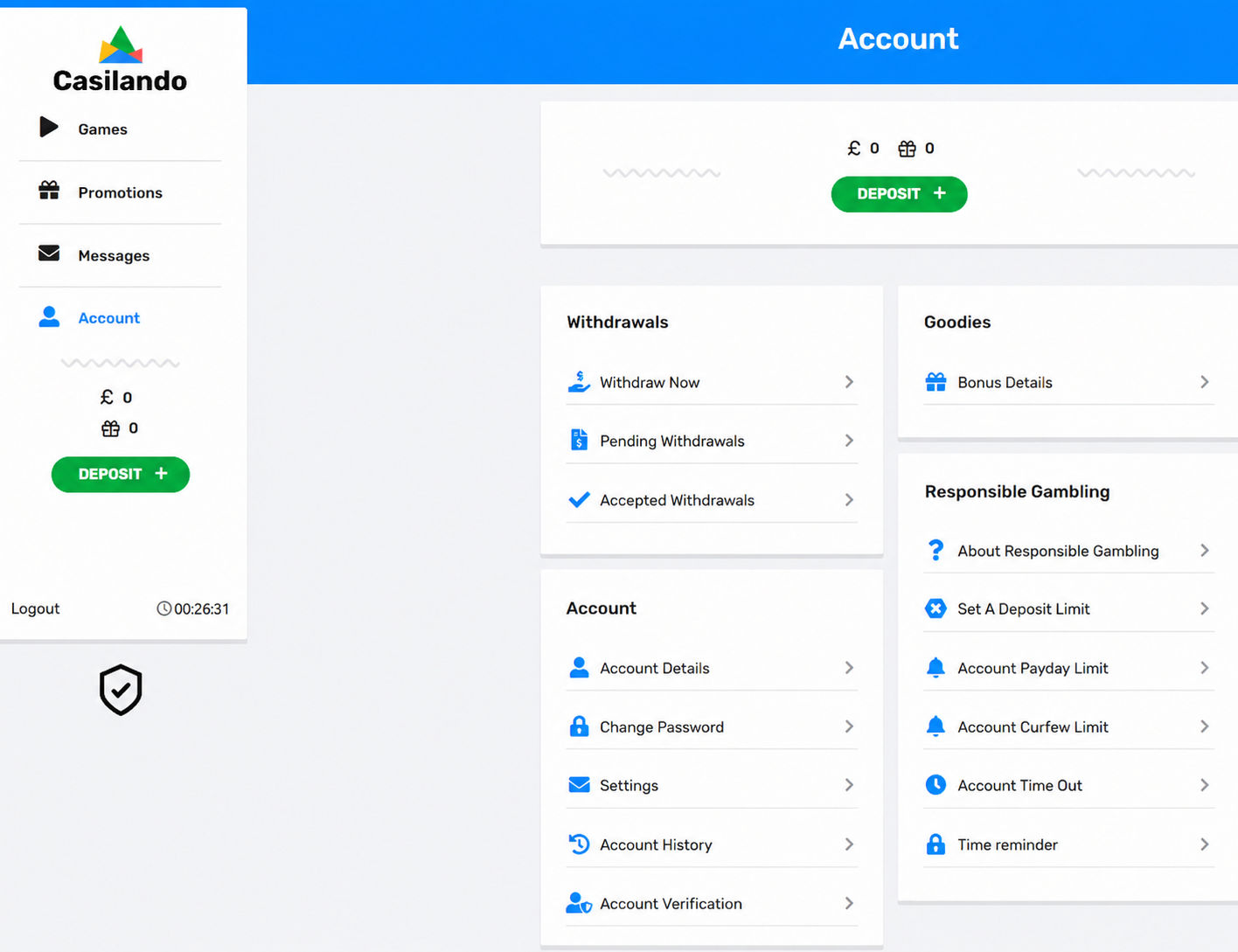
(05:08) CUSTOMER: I have uploaded a screenshot of my “My Account” → “Responsible Gambling” section.
As you can see, it includes options such as deposit limits, payday limits, curfew limits, time-out, and time reminder.
However, there is no self-exclusion option visible anywhere in this section.
You previously stated that self-exclusion can be applied by myself via the link provided and within the account, but based on both the page and my account interface, I cannot find any such option.
Please can you now clearly confirm:
Is there a self-exclusion tool available for users to activate themselves within the account?
If yes, please identify exactly where it is shown in this screenshot or provide the precise navigation path.
If not, please confirm that self-exclusion must be applied via support.
(05:10) Mason: I will raise this with our Safer Gambling team so that we make it that you are able to set a self-exclusion on your end. However, in the meantime I would advise that should you wish to set a self-exclusion, kindly join us on live support and we will have it applied.
(05:12) CUSTOMER: Thank you for confirming.
Just to clarify, based on your response:
At present, there is no self-exclusion option available for users to activate directly within their account, and it must be applied via support.
Please confirm that this is correct.
(05:12) Mason: Yes, this is correct.
(05:14) CUSTOMER: Thank you for confirming.
I would like to understand something further:
Your Responsible Gambling policy states that you provide a self-exclusion facility and describes it as something that can be applied by the user.
However, you have now confirmed that there is no option to activate self-exclusion directly within the account, and that it must be applied via support.
Can you please explain why the policy presents self-exclusion as a user-applied tool, when in practice it is not available for users to activate themselves?
I would appreciate clarification on this discrepancy.
(05:15) Mason: Thank you for bringing this to my attention, XXXXXXXX. However, our policy states that you would need to contact customer support should you wish to apply a standard closure.
(05:16) Mason: A self-exclusion, sorry.
(05:19) CUSTOMER: I would like to clarify something based on our conversation.
Earlier, you confirmed that self-exclusion could be applied by the user and directed me to a link which you said would allow me to do this myself without support.
You have now confirmed that self-exclusion cannot be activated directly within the account and must be applied via support.
You also stated that this is what your policy says.
However, the Responsible Gambling policy describes self-exclusion as a process that can be selected and confirmed by the user, which implies it is user-controlled.
So there are three conflicting points:
1. You initially stated it can be done by the user
2. You have now confirmed it cannot be done by the user
3. The policy presents it as a user-applied process
Can you please clarify which of these is correct, and explain why the information provided earlier and in the policy does not match how the system actually functions?
(05:22) Mason: I would like to confirm that this is still user-controlled, as a self-exclusion will not be applied until the user requests for it.
Secondly, it was an error on my part to have confirmed that the user can apply a self-exclusion and after going through the interface on my end, and read the policy states that the user can join customer support to request a self-exclusion.
I hope this clarifies your questions, may I ask if you have a self-exclusion request?
(05:29) CUSTOMER: like to put the following on record for clarity.
Your Responsible Gambling Policy states the following regarding self-exclusion:
“When administering the self-exclusion on your account, the onus is on you to complete the process which is to confirm that you understand the exclusion restrictions and then click a link that takes you to a page where you must select the period of time you wish to be excluded for, and to confirm that self-exclusion by clicking ‘submit’. You will then receive an email to confirm that the self-exclusion has been successful.”
It also states:
“If you are unable to complete the automated process yourself, then you must contact Customer Support and request that they apply the self-exclusion for you…”
This clearly describes an automated, user-operated self-exclusion process within the account, with Customer Support only as a fallback.
However, during this conversation you have confirmed that:
There is no self-exclusion option available within the account interface
There is no navigation path or button to access such a process
Self-exclusion must be applied via Customer Support
This means that the process described in your policy (automated self-exclusion via user action) does not match the actual functionality available on the platform.
Please confirm the following clearly:
Does an automated self-exclusion tool (as described in your policy) currently exist within the user account interface?
If not, why does your policy describe a user-completed automated process that is not actually available?
Can you confirm that, in practice, self-exclusion can only be applied via Customer Support?
I would appreciate a clear and accurate explanation so that this discrepancy is properly understood.
(05:34) Mason: My apologies for the confusion, XXXXXXXX. The reason why I confirmed this with you is that I was under the impression that the user is able to apply a self-exclusion without having to join live support. After going through the policy, I confirmed that you were right that there is no option for a self-exclusion to be applied by the user.
After this, I confirmed that I am going to reach out to our Safer Gambling team, as if this is an issue, we would need to have it corrected.
I then confirmed that should you request a self-exclusion, kindly join us on live support as the user related self-exclusion application is currently not available.
May I reiterate my question, do you have a self-exclusion request?
(05:35) Mason: As you've stated, the process to join customer support is a fallback. At this time, should you wish to self-exclude, you're welcome to use the fallback method.
(05:41) Mason: Customer?
(05:41) CUSTOMER: hi
(05:41) Mason: Do you have have a self-exclusion request?
(05:42) CUSTOMER: Thank you for your responses and for clarifying the current position.
I will leave it there for now, as the situation is clear based on your explanations.
Customer Support Transcript 31 March 2026 @ 02:00 AM
(02:00) Casilando : Hello. Please fill in your details below.
(02:01) Customer Full Name: A Customer
Email Address: A.Customer@mail.co.uk
(02:01) Casilando : Thank you for reaching out.
(02:01) Casilando: Please hold, you will be connected to an agent as soon as one is available.
(02:08) Elsa: Hello! 👋🙂
Thank you for connecting with me. You're speaking to Elsa. How do I have the pleasure of assisting you today?
(02:09) Customer: hi Elsa
(02:09) Customer: how are you?
(02:09) Elsa: I'm well thank you. How are you?
(02:10) Customer: good, thank you
(02:10) Customer: I was wondering if you had an automatic self-exclusion on your website without having to wait to come through to live chat.
(02:11) Elsa: I'm happy to have a look into this for you 🙂 . Before we move forward, I just need some information from you for a quick security check. Please could you provide me with your full name as well as email address on your account?
(02:11) Customer: A Customer
(02:11) Customer: A.Customer@mail.co.uk
(02:14) Elsa: Thank you
(02:14) Customer: no promlem dear
(02:15) Elsa: Are you wanting to self exclude?
(02:16) Customer: No, I do not want to self-exclude now. I'm just wondering what is the quickest way of doing it if I should need it in the future. That's why I'm asking if you have an automated system that could quickly do it if I need to.
(02:18) Elsa: You are welcome to have a read through these options: https://www.casilando.com/en/responsible-gambling
(02:20) Customer: please wait
(02:25) Customer: Thank you, I’ve had a proper look through both the Responsible Gambling page and my account settings.
In my account I can see options like About Responsible Gambling, setting a deposit limit, payday limit, curfew limit, time-out and reminders, but I cannot see any option anywhere for self-exclusion.
So I’m a bit confused, as I can’t find any way to do this myself.
Could you please explain how I would apply self-exclusion myself, and whether there is an automatic way to do it without having to go through live chat?
(02:26) Elsa: If you do not have the option, you would then need to reach out and our relevant team will assist you.
(02:30) Customer: please wait
(02:31) Web User 69cb2ab3d1c99d0264353e18 uploaded: fa57ce67-0fb1-4582-b00b-124d09dba91b - Copy.png
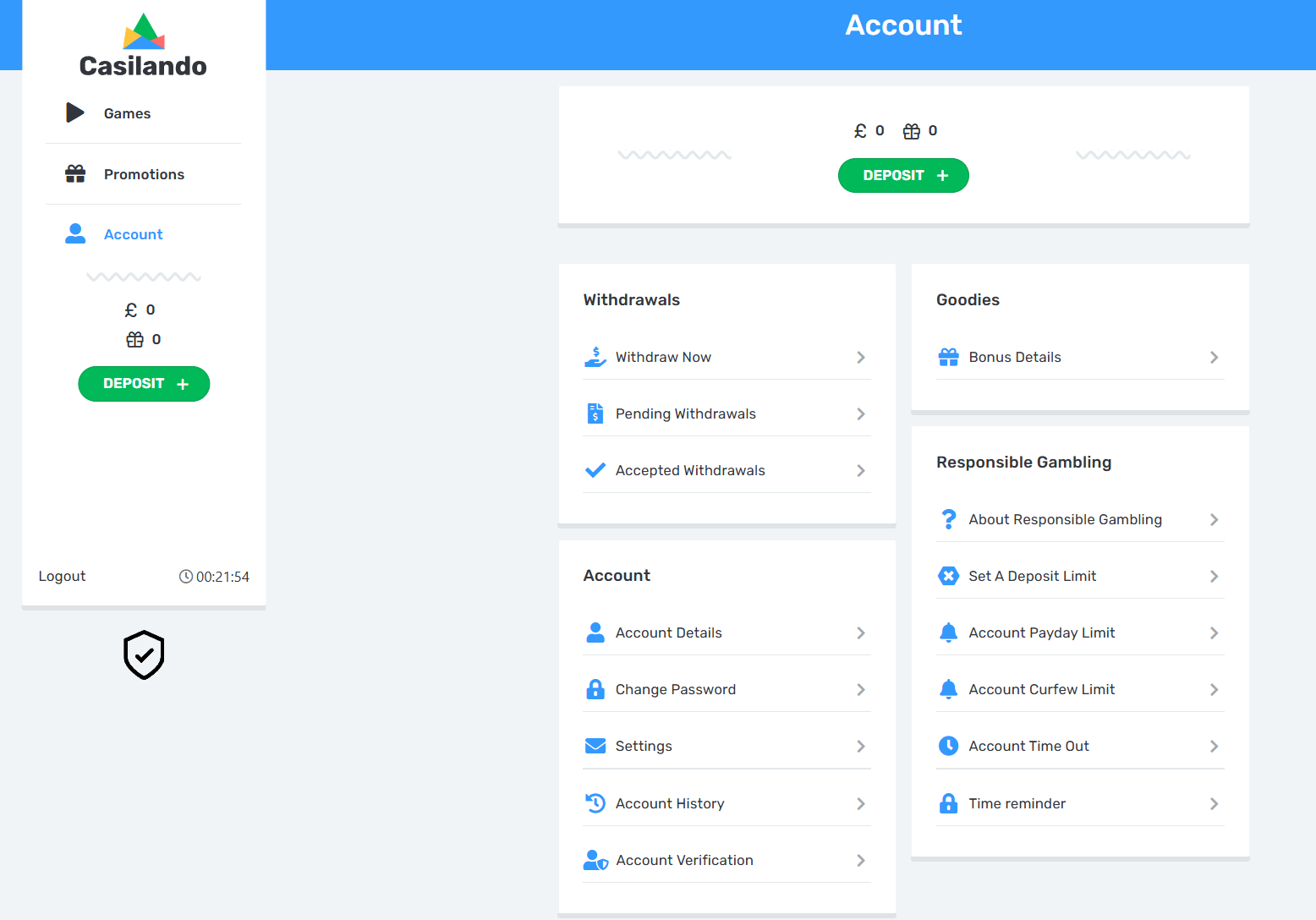
(02:31) Customer: Thank you for your reply.
I’m just trying to understand this properly.
I have checked my account carefully and, as you can see, the only options available are things like deposit limits, payday limits, curfew limits, time-out and reminders. There is no self-exclusion option anywhere in my account.
I have also read the Responsible Gambling policy that you sent me, and that seems to describe a process where the user can complete the self-exclusion themselves.
So I’m a bit confused, because what I can see in my account does not match what is described in your policy.
Could you please confirm clearly whether there is currently any way for me to apply self-exclusion myself within my account, or if it can only be done through support?
(02:35) Elsa: If the option is not available on your account, you would then need to reach out on our LiveChat and our relevant team will assist you.
(02:38) Customer: I’m not asking a hypothetical question.
I have already checked my account and I have also sent you a screenshot showing the available options. There is no self-exclusion option anywhere.
So I need you to check this properly and confirm based on what is actually on your website.
Can you please confirm clearly, based on my account and the screenshot I’ve provided, whether there is a self-exclusion option available for me to activate myself, or if it is only possible through your support team?
Please do not answer conditionally I just need a clear confirmation of how it works.
(02:43) Elsa: You will then need to reach out on LiveChat and our team will assist you.
(02:44) Customer: Thank you.
So just to confirm, there is currently no self-exclusion option available within the account itself, and it can only be applied by contacting your support team via LiveChat, is that correct?
(02:46) Elsa: In your situation, yes.
(02:47) Customer: I’m a bit confused by that.
When you say “in my situation”, are you saying that other users do have a self-exclusion option available within their account?
Or is it the case that no users are able to apply self-exclusion themselves within the account and it is only done through support?
I’m just trying to understand whether this is a system feature or not.
(02:56) Elsa: Yes. The option are available on some account. If it cannot be found on the account, as in your situation, the player would then reach out via LiveChat and our team would assist.
(03:01) Customer: I’m struggling to understand that.
If this option is available on some accounts, then it should have a clear location within the account interface.
Could you please explain exactly where this self-exclusion option appears for those accounts, including the section or menu it is located in?
I would like to understand how this works in practice.
(03:08) Elsa: To confirm based on your account and the screenshot you provided:
There is currently no self-exclusion option available within your account interface.
In your case, self-exclusion can only be applied through our support team via LiveChat or email.
Regarding your question about where this option appears for other users:
On accounts where the feature is enabled, the self-exclusion option is typically found within:
Account Settings or Profile Settings
Under sections such as Responsible Gambling or Limits & Controls
However, this feature is not consistently available across all accounts or regions, which is why you are not seeing it on your profile.
So in practice:
If the option is visible → it can be applied directly in the account
If the option is not visible (as in your case) → it must be requested via support, and we will apply it for you immediately upon request
I completely understand the confusion, especially since the Responsible Gambling page describes the feature in general terms. I’ll also make sure to pass this feedback along, as it’s a very valid point.
If you ever do wish to self-exclude, you can simply contact us and we’ll action it for you straight away — no delays.
(03:11) Customer: thank you
Customer Support Transcript 31 March 2026 @ 08:46 AM
(08:46) Casilando : Hello. Please fill in your details below.
(08:47) Customer Full Name: A Customer
Email Address: A.Customer@gmail.com
(08:47) Casilando : Thank you for reaching out.
(08:47) Casilando: Please hold, you will be connected to an agent as soon as one is available.
(08:57) Tameron: Hey🙂 You are through to Tameron. How may I assist you today?
(08:57) Customer: just wondering what is happening with my account
(08:58) Tameron: Could you please provide more information?
(08:59) Customer: I self-excluded on the 26/02/2026 and i had a balance of about £1680 but the balance has not been returned to the account
(09:01) Tameron: Thank you for sharing the above with me...
Please allow me a moment to check the account for you.
(09:01) Customer: ok, thanks
(09:03) Tameron: I appreciate you waiting on chat with me.
Could you please confirm whether you have submitted the relevant documents that was requested from you?
(09:03) Customer: no I have not
(09:05) Tameron: Duly noted.
In this case you need to refer & respond to the email sent to you on, 26/02/2026.
(09:07) Customer: Just to clarify the timeline:
My account was restricted by you during active gameplay at around 07:50 on 26/02/2026, not as a result of any withdrawal request.
I then self-excluded afterwards, and the remaining balance relates to funds already deposited and partially used prior to that restriction.
Can you please confirm clearly:
Are you stating that my remaining balance will not be returned unless I submit the requested documents?
And if so, please confirm the basis for this, given that the account was allowed to deposit and gamble prior to any verification being completed.
(09:09) Tameron: Yes, that is correct.
(09:11) Tameron: Is there anything else I may assist you with?
(09:11) Customer: yes, please wait
(09:11) Tameron: Sure...
(09:17) Tameron: As much as I don't like ending chats, as there has been no activity, I would have to end it.
I hope the remainder of your day unfolds beautifully.
If you find yourself with additional questions later on, please feel free to reach out to us whenever you wish.
(09:18) Customer: please WAIT!!!
(09:18) Customer: i waited over 10 minutes for you! you cant wait 5???
(09:18) Customer: To be clear:
• I was able to deposit and gamble without restriction
• My account was then restricted by you during active gameplay at around 07:50 on 26/02/2026
• This was not triggered by any withdrawal request
• I then self-excluded afterwards
• A remaining balance of approximately £1,680 was left in the account
You have now confirmed that this balance will not be returned unless I submit documents.
Can you explain why verification was not required before or during the deposits and sustained gambling activity set out below, but is now being required before returning my remaining balance?
Initial activity:
16 February 2026
£20 at 16:55
£20 at 20:10
£20 at 20:25
£20 at 21:57
£20 at 22:26
25 February 2026
£10 at 14:36
£20 at 15:24
£20 at 15:32
£20 at 15:50
£50 at 15:57
£300 at 16:18
£500 at 16:35
£500 at 17:09
£750 at 17:14
£750 at 00:07
£750 at 06:43
Also, please confirm whether there are any specific money laundering concerns on my account, or if this is a general requirement.
(09:22) Customer: You haven’t answered the question.
I am not disputing that you may request documents.
I am asking why verification was not required before or during the deposits and gambling activity, but is now required before returning my remaining balance.
Please answer that directly.
Also confirm whether there are any specific money laundering concerns on my account, or if this is a general requirement.
(09:29) Customer: hello
(09:32) Tameron: Do note the chat needed to end, due to inactivity.
(09:32) Tameron: Pertaining to the documents that are obligatory….
Please note that there are additional documents requested, which are distinct from the typical verification documents.
(09:33) Customer: That does not answer my question.
I am not asking what documents are required.
I am asking:
Why was verification not required before or during my deposits and gambling activity, but is now being required before returning my remaining balance?
You have now avoided this question multiple times.
If you are unable to answer it, please escalate this to a supervisor who can.
(09:34) Tameron: Verification documents are not being requested now, additional documents are being requested from you.
You need to refer to the email sent from the relevant team in this case please.
(09:38) Customer: I have reviewed the email and understand the documents being requested.
However, my question remains unanswered.
These checks relate directly to deposits that were already accepted and used for gambling.
So I need a clear explanation of why these checks were not applied before or during that activity, but are now being applied before returning my remaining balance.
If you are unable to answer this, please confirm and escalate this to a supervisor.
(09:41) Tameron: I appreciate you sharing the above.
You are welcome to refer to clause 5.4 of the below terms:
https://www.casilando.com/gb/terms-conditions
Customer Support Transcript 13 April 2026 @ 05:06 AM
(05:06) Casilando: Hello. Please fill in your details below.
(05:07) Customer Full Name: A Customer
Email Address: A.Customer@gmail.com
(05:07) Casilando: Thank you for reaching out.
(05:07) Casilando: Please hold, you will be connected to an agent as soon as one is available.
(05:08) Kelly: Hi there 😊️
(05:08) Kelly: You're through to Kelly and I will be assisting you today.
(05:09) Customer: Hi, Just wondering what is happening with my account and the balance which i think was £1680
(05:11) Kelly: I would gladly look into your query for you.
(05:11) Kelly: Please confirm your full name and email address.
(05:11) Customer: A Customer - Customerminaee7@gmail.com
(05:12) Kelly: Thank you for confirming Customer.
(05:13) Kelly: Please allow me a moment to review your account.
(05:14) Customer: ok
(05:14) Kelly: Thank you for your patience 🌸️
(05:16) Kelly: We have reviewed your account and can see that you were previously requested to provide your outstanding documents. Kindly refer to the email sent to you by our Accounts Team on 26 Feb 2026 and respond directly to it in order for our team to proceed with the review of your manual cash out request.
(05:16) Kelly: Please check your Spam and Junk mail as well.
(05:19) Customer: Thank you Kelly.
Just so I understand the position clearly:
1. Can you please confirm the current balance on my account? from memory it was about £1,680
2. Is that balance currently being withheld until I provide the requested documents?
(05:22) Kelly: The exact amount is 1,875.79GBP
Please refer to the email requesting your documentation and provide this in order for us to proceed.
(05:24) Kelly: Is there anything else I may assist you with today?
(05:24) Customer: Thank you Kelly.
Just to confirm clearly:
Is the balance of £1,875.79 GBP currently not accessible to me and being held until I provide the requested documents?
(05:26) Kelly: We require the documents in question in order for our team to proceed with your request.
This is to satisfy our licence obligations, routine security checks and to safeguard the integrity of your account as per the terms accepted by you when joining our casino.
https://www.casiland
(05:26) Kelly: https://www.casilando.com/en/terms-conditions
(05:26) Customer: Thank you Kelly.
I understand the document request.
However, I just need a clear answer to the question I asked.
Is the balance of £1,875.79 currently accessible to me, or is it being held pending the completion of these checks?
(05:27) Kelly: We would only be able to proceed with your request once the requested documents have been provided.
(05:27) Kelly: Is there anything else I may assist you with today?
(05:28) Customer: WAIT!!! DONT RUSH ME!!!
(05:28) Kelly: Please elaborate on how I can further assist you.
(05:29) Customer: Thank you.
Just to confirm clearly, based on your response:
I am currently unable to access or withdraw the balance of £1,875.79 until I provide the requested documents, is that correct?
(05:29) Kelly: We would only be able to proceed with your request once the requested documents have been provided.
(05:30) Customer: Thank you Kelly.
Just to clarify, I have not made a withdrawal request. I self-excluded my account.
So I would like to understand clearly:
Am I currently able to access or withdraw my balance, or is access to my funds restricted at this time?
(05:31) Kelly: A manual cash out request was escalated for your funds as you no longer have access to your account.
(05:32) Kelly: We require the documents in question in order for our team to proceed with your request.
This is to satisfy our licence obligations, routine security checks and to safeguard the integrity of your account as per the terms accepted by you when joining our casino.
(05:34) Kelly: Please refer to the email requesting your documentation and provide this in order for us to proceed.
(05:34) Customer: Thanks Kelly,
I just wanted to clarify something regarding self-exclusion.
On the day I contacted your team to self-exclude via live chat (26 February 2026), I had actually attempted to self-exclude earlier during my session, but I was unable to find any option to do so within the account interface.
Could you please confirm whether, at that time, there was any way for a user to initiate self-exclusion directly through the account without contacting support?
(05:41) Customer: are you there?
(05:43) Kelly: Please allow me a moment while I connect you with a Senior Host.
(05:45) Mason: Hi Customer, I will be assisting you further.
(05:45) Customer: Thank you Mason
(05:47) Mason: We note that should you visit the responsible gambling link https://www.casilando.com/en/responsible-gambling which will provide you with a list of our responsible gambling tools along with the option to have a self-exclusion applied.
(05:48) Customer: Thank you Mason.
I have already reviewed that page carefully.
The page describes self-exclusion as something that can be applied by the user, however within my account interface under responsible gambling, there is no self-exclusion option available, only limits and time-out.
So just to confirm clearly:
At that time, was there any way for me to initiate self-exclusion directly through my account without contacting support?
(05:49) Mason: Yes, I can confirm that our site does allow you to initiate a self-exclusion on your end. Should this option be difficult to locate, you would need to this our FAQ page which would also allow you to setting a self-exclusion.
(05:50) Customer: Thank you Mason.
I just want to make sure I understand this correctly.
Based on what you’ve said, you are confirming that there is a self-exclusion option available within the account interface that allows a user to initiate self-exclusion themselves.
Could you please confirm exactly where this option is located within the account, including the specific section or path, so I can understand how this is accessed?
(05:52) Mason: On my end, when I follow the responsible gambling link, and head down to the Self-exclusion section, it states "To initiate self-exclusion please click here [https://www.surveymonkey.com/r/v2_casilando]."
(05:53) Mason: This redirects your to a page where a self-exclusion page populates.
(05:53) Mason: Should you have issues with initiating the self-exclusion here, you could also visit our FAQ page where it would also re-direct you to setting a self-excluion should you wish.
(05:55) Customer: Thank you Mason.
I have followed that link, and it appears to direct to an external survey form rather than an option within the account interface.
So just to confirm clearly:
Is this survey form the only way for a user to initiate self-exclusion themselves, rather than having a self-exclusion option directly available within the account settings?
(05:56) Mason: Upon completing the survey, it asks your reason with how long you wish to be self-excluded for. The survey is a self-help method to apply the self-exclusion on your end.
(05:57) Mason: This is directly apply a self-exclusion.
(05:57) Mason: I am happy to provide you with this information, however I can confirm that your account has been placed under an Operator Exclusion. Please also note that this exclusion extends across our entire network and you have also been blocked from further registrations.
We would advise that if you have not already done so, that you seek free support from gambling related organisations such as Gamcare (www.gamcare.org.uk) [http://www.gamcare.org.uk)] or BeGambleAware (www.begambleaware.org) [http://www.begambleaware.org)] or you can call the National Gambling Helpline free on 0808 8020 133. There are also more general support agencies such as the Samaritans www.samaritans.org [http://www.samaritans.org] who provide support 24 hours a day, 365 days a year, and who you can call for free on 116 123.
We would also like to draw your attention to the following link, which gives details of an online multi-operator self-exclusion scheme, which enables you to sign up and automatically be self-excluded across most UK operators: https://www.gamstop.co.uk
Additionally, we encourage you to install Betblocker: www.betblocker.org [http://www.betblocker.org] which is a gambling website blocking software.
We also advise that you contact other operators that you may hold accounts with and self-exclude from those also.
(05:58) Customer: Thank you Mason.
Just to confirm clearly based on your explanation:
There is no self-exclusion option available directly within the account interface, and the only way for a user to initiate self-exclusion themselves is by completing an external survey form, or by contacting support, is that correct?
(06:01) Mason: I'm sorry, that is not what I said.
(06:01) Mason: The reason I gave you the link route is that you are currently restricted by logging in, and you would not be able to visit your account interface, however I can confirm that you can set a self-exclusion when you're logged in.
(06:02) Customer: Thank you Mason.
Just so I understand correctly:
You are confirming that when a user is logged into their account, there is a self-exclusion option available directly within the account interface.
Could you please confirm exactly where this option is located within the account, including the specific section or path?
(06:03) Mason: Are you currently logged-in to an account?
(06:08) Customer: Thank you Mason.
I have reviewed your Responsible Gambling Policy carefully.
The policy describes a process where the user completes the self-exclusion themselves by selecting a period and confirming it, and states that contacting support is only required if the user is unable to complete the automated process.
However, based on what you have explained, there is no option within the account interface to do this, and the only methods available are an external survey form or contacting support.
Could you please clarify how the process described in your policy is actually completed by a user within the account interface?
(06:10) Mason: This is very concerning, as your account is already under an operator exclusion, your descriptions gives me the impression that you're currently logged-in to an account. Are you currently logged-in to an account?
(06:13) Customer: I’m not asking about my current access.
I’m referring specifically to my session on 26 February 2026.
At that time, I was logged into my account and checked the Responsible Gambling section, which only displayed options such as deposit limits, curfew limits, time-out and reminders, and there was no self-exclusion option available.
Based on your explanation that users can initiate self-exclusion within the account, could you please explain where within the account interface this option was available at that time?
(06:18) Mason: Thank you for providing that clarification, and yes I would like to confirm that there is a Frequently Asked Questions page within the interface, should you not locate the self-exclusion page, you could click on the FAQ page which would re-direct you to another section of what is most frequently asked, one of the questions is 'how to self-exclude' this will re-direct you to a section where you can set a self-exclusion.
(06:20) Customer: Thank you Mason.
Just to confirm clearly based on your explanation:
There is no self-exclusion option available directly within the Responsible Gambling section of the account interface, and instead a user would need to navigate through FAQ links or external pages in order to initiate self-exclusion, is that correct?
(06:20) Mason: The FAQ is within the account interface.
(06:21) Mason: That is incorrect.
(06:22) Customer: Thank you Mason.
I understand that the FAQ is accessible within the account interface.
However, I am referring specifically to a direct self-exclusion control within the Responsible Gambling section, similar to the other tools such as deposit limits and time-out, where a user can select a period and confirm the action immediately.
Based on your explanation, it appears that self-exclusion cannot be applied directly within that section, and instead requires navigating through FAQ links or external pages.
Could you please confirm whether there is a direct self-exclusion option within the Responsible Gambling section itself?
(06:25) Mason: The FAQ would only be used/needed in instances if you're unable to locate the self-exclusion section. I can confirm that there a self-exclusion option in your account interface like with all our other responsible gambling tools.
(06:29) Customer uploaded: 26-02-2026.png
(06:29) Customer uploaded: 2-26-02-2026.png
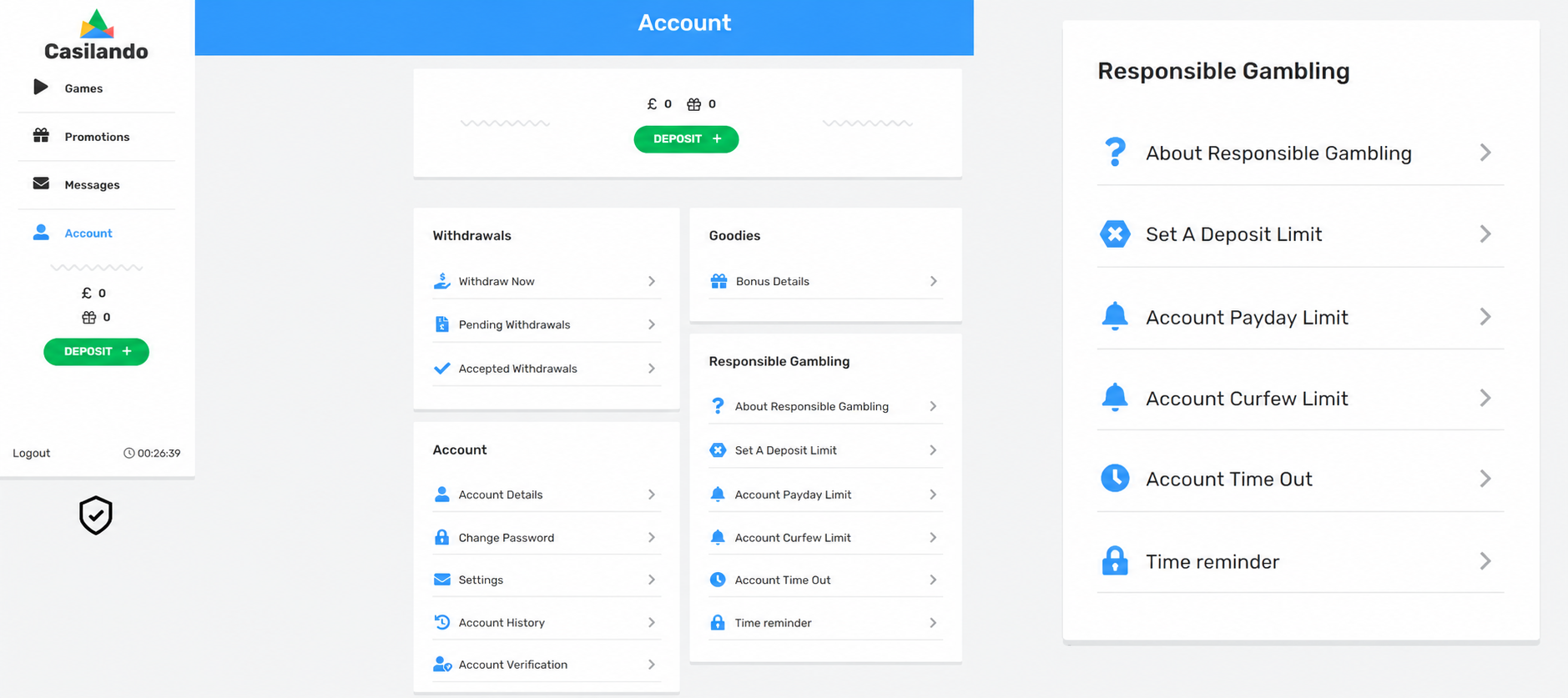
(06:29) Customer: Thank you Mason.
For clarity, on 26 February 2026 when I attempted to self-exclude during my session, I took a screenshot of the Responsible Gambling section within the account.
As shown, all available safer gambling tools are visible, including deposit limits, payday limits, curfew limits, time-out and reminders, however there is no self-exclusion option present within that section.
Given your confirmation that a self-exclusion option exists within the account interface, could you please confirm exactly where within the account this option is located?
(06:31) Mason: Thank you for providing this as an explanation, however I am also currently logged in to a test account and can view the self-exclusion option. I'm unable to provide you with the screenshots as the test account has information I am unable to display or share with our customers.
I cannot speak on what happened on the 26/02/2026 when you were looking for the self-exclusion page.
(06:32) Mason: I clicked on the about Responsible gambling section.
(06:32) Mason: Which is still the interface.
(06:34) Customer: I’m trying to understand how this works in practice.
Given that the process described in your Responsible Gambling Policy does not appear to be available within the account interface, and based on the explanations provided so far, this seems like a significant discrepancy.
Could you confirm whether this has been raised internally before, and how it is intended to operate for users in practice?
(06:40) Mason: I can confirm that a self-exclusion can be applied via the interface, to my knowledge I haven't seen the instance that you're providing right now. Should this have been an issue, I can confirm that it has been raised internally as the option to self-exclude is available.
(06:45) Mason: Is there anything else I can assist with?
(06:45) Customer: This is really confusing for me. I clearly wasn’t able to self-exclude automatically when I tried, and from what I could see in the account, there wasn't a direct option to do it. Surely I can’t be the only person who has experienced this?
(06:47) Mason: I haven't come across another instance like this, and if it was like this for you, I do see how it would have been an inconvenience, yes. However, it seems that the self-exclusion is an option within the account interface.
(06:52) Customer: Thank you, Mason. Just want to confirm, are you the only Mason in support?
(06:53) Mason: Yes, I am.
(06:54) Mason: Take care, Customer.
(06:54) Customer: Just so I understand, what does a Senior Host mean in your team?
(06:55) Mason: It means a host who has seniority amongst the team.
(06:56) Customer: PLEASE DONT GO
(06:56) Mason: Is there anything else I can assist with?
(06:58) Customer: Just so I understand this properly before we close:
You’ve confirmed that you are the Senior Host and that you haven’t come across this type of issue before.
(07:00) Mason: Yes, that is correct.
(07:02) Customer: Just so I understand, are you part of the Casilando team directly, or do you work for the wider operator behind the site, White Hat Gaming Limited
(07:05) Mason: I work for the licensee and the site, in this instance, the 2 work in conjuction with one another.
(07:08) Customer: Thank you Mason, Bye